Core Web Vitals Explained for Business Owners (LCP, INP and CLS)
Core Web Vitals measure how fast, responsive and stable your pages feel. Here is what LCP, INP and CLS mean in plain language, how to check them and what usually fixes them on WordPress.
 pasindukw
· 7 min read

In this article
- What are Core Web Vitals?
- The thresholds
- LCP: Is the important content showing up fast?
- INP: Does the page respond when I tap?
- CLS: Does the page stay still?
- How to check your own site
- What fixes Core Web Vitals on WordPress
- The usual suspects we find in audits
- How much do Core Web Vitals affect rankings?
- What to ask your developer
If you have ever run your website through Google PageSpeed Insights, you have seen a wall of red, orange and green numbers with names like LCP, INP and CLS. Developers talk about them constantly. Business owners are left wondering whether any of it matters — and if it does, what to ask for.
This guide explains Core Web Vitals in plain language: what each metric measures, what counts as good, how to check your own site, and the fixes that make the biggest difference on WordPress. No code required.
What are Core Web Vitals?
Core Web Vitals are three measurements Google uses to describe how a page feels to a real visitor:
- Largest Contentful Paint (LCP) — how quickly the main content appears.
- Interaction to Next Paint (INP) — how quickly the page responds when someone taps, clicks or types.
- Cumulative Layout Shift (CLS) — how much the page jumps around while it loads.
Together they cover the three most common frustrations on the web: waiting, lag and things moving under your finger. Google includes them in its page experience signals, and Chrome collects them from real visits, so they reflect what your customers actually experience — not just a test in a lab.
The thresholds
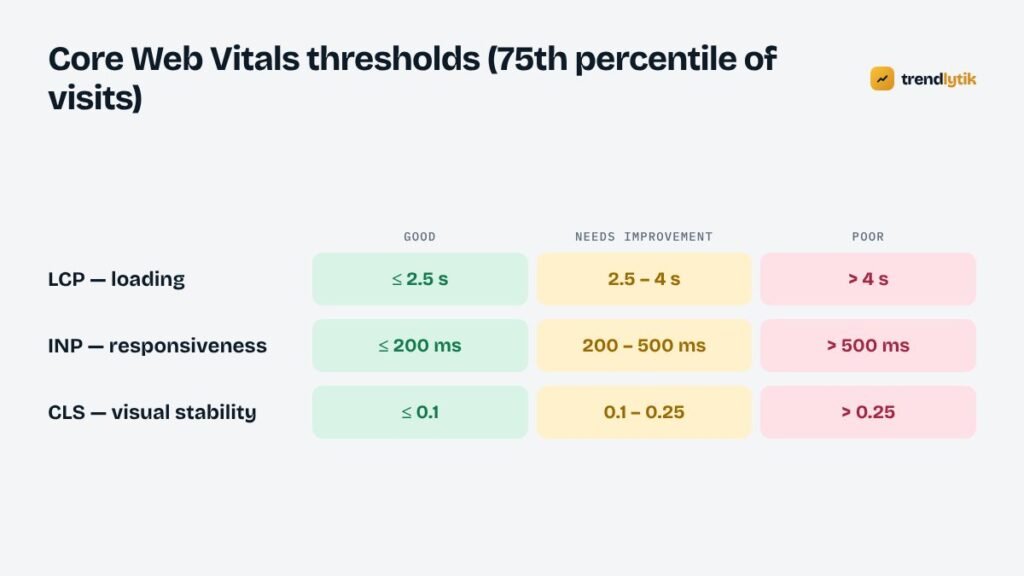
Each metric has three bands: good, needs improvement and poor. Google looks at the 75th percentile of visits — meaning at least three out of four visits must meet the “good” threshold for a page to pass.
- LCP: good is 2.5 seconds or less; poor is more than 4 seconds.
- INP: good is 200 milliseconds or less; poor is more than 500 milliseconds.
- CLS: good is 0.1 or less; poor is more than 0.25.
LCP: Is the important content showing up fast?
Largest Contentful Paint measures the moment the biggest visible element — usually the hero image, a large heading or a product photo — finishes rendering. To a visitor, that is the moment the page looks “loaded”.
Common causes of slow LCP on business websites:
- A huge hero image. A photo straight from a camera can be several megabytes. Visitors on mobile data wait for every byte.
- Render-blocking CSS and fonts. The browser cannot draw the page until it has downloaded the stylesheets and, often, the web fonts.
- Slow server response. Cheap or overloaded hosting and pages that are rebuilt from the database on every visit add delay before anything else can happen.
- Lazy-loading the hero image. Lazy loading is great for images further down, but applied to the main image it delays the very thing LCP measures.
- Sliders and carousels that load several large images and a script before showing the first slide.
INP: Does the page respond when I tap?
Interaction to Next Paint replaced First Input Delay as a Core Web Vital in March 2024. It measures the delay between an interaction — tapping a menu button, opening an accordion, adding to cart — and the next visual update. INP considers interactions throughout the whole visit and reports one of the slowest, so a single sluggish menu can drag the score down.
Poor INP is almost always caused by too much JavaScript running on the main thread:
- Page builders that load large scripts on every page whether they are needed or not.
- Stacks of plugins, each adding its own scripts and event listeners.
- Third-party tags — chat widgets, heat maps, multiple analytics tools, social embeds and ad scripts.
- Heavy animations triggered on scroll.
CLS: Does the page stay still?
Cumulative Layout Shift measures unexpected movement. You start reading, an image or banner loads above the text, and everything jumps down. Or you go to tap a button and an advert pushes it away at the last moment. CLS adds up those shifts.
Typical causes:
- Images without width and height attributes, so the browser does not know how much space to reserve.
- Ads, embeds and iframes that load into containers with no fixed size.
- Web fonts that swap in with different dimensions from the fallback font.
- Cookie banners and promotional bars injected at the top of the page after it has rendered.
How to check your own site
PageSpeed Insights
Enter a URL at PageSpeed Insights. The top section, “Discover what your real users are experiencing”, shows field data from the Chrome User Experience Report — the data Google uses. The lower section runs a Lighthouse lab test and gives a 0–100 performance score. The lab score is useful for diagnosing problems, but it varies between runs and it is not the Core Web Vitals assessment itself.
Newer or smaller sites may not have enough traffic for field data. In that case, use the lab results as a guide and focus on the fixes below.
Google Search Console
The Core Web Vitals report in Search Console groups similar URLs and shows which groups are good, need improvement or are poor, separately for mobile and desktop. It is the best way to see problems across a whole site rather than one page at a time.
Test like a customer
Open your site on an average mid-range phone over mobile data, not on your office Wi-Fi. If it feels slow to you, it feels slow to customers.
What fixes Core Web Vitals on WordPress
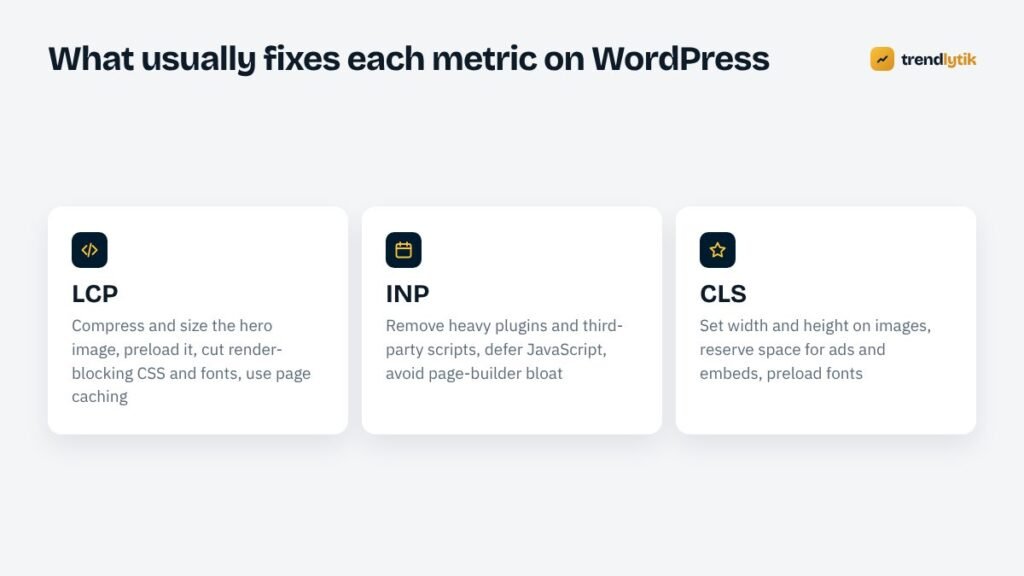
The most effective improvements are usually structural rather than cosmetic:
1. Fix images
Resize images to the size they are displayed, compress them, serve modern formats where possible and always include width and height attributes. Lazy-load images below the fold, but load the hero image eagerly — and preload it if it is the LCP element.
2. Use good hosting and page caching
A fast server response is the foundation for everything else. Page caching serves a ready-made HTML file instead of rebuilding each page from the database. Many hosts include server-level caching; otherwise a single, well-configured caching plugin is enough.
3. Reduce JavaScript
Audit every plugin and third-party script. Remove what you do not use, load the rest only on the pages that need it and defer non-critical scripts. This is the single biggest lever for INP.
4. Self-host and preload fonts
Hosting fonts on your own domain avoids extra connections. Preloading the main font files and using font-display: swap keeps text visible while fonts load. Limiting the number of font weights also helps.
5. Reserve space for everything
Give ad slots, embeds and banners fixed dimensions, and avoid inserting content above what the visitor is already reading.
6. Reconsider the page builder
Page builders are convenient, but they add code to every page to support layouts you may never use. For many business sites, a lean, hand-built theme performs dramatically better with the same design. We explain the trade-offs in why we build without page builders.
The usual suspects we find in audits
When we audit slow WordPress sites, the same handful of problems come up again and again:
- Several plugins doing the same job. Two caching plugins, three “optimisation” plugins and a security plugin all rewriting the same files is a recipe for slow pages and odd bugs.
- A slider on the home page whose first image is the LCP element, but which is loaded by JavaScript after everything else.
- Full font families — every weight and style, sometimes from two different font services — when the design uses three.
- Chat widgets and marketing tags loading on every page, including ones where nobody ever uses them.
- Unoptimised uploads: a 5,000-pixel-wide photo displayed in a 400-pixel card.
- Old PHP versions on the server. Newer supported PHP releases are faster and more secure, and most hosts let you switch in a few clicks after a compatibility check.
None of these needs a redesign to fix. A careful clean-up often moves a site from “poor” to “good” on its own — and when it does not, the remaining problems point clearly to the theme or page builder.
How much do Core Web Vitals affect rankings?
Honestly: less than many tools imply. Google has been clear that great content relevant to the search still wins, and that page experience is one signal among many. A slow page with the best answer can outrank a fast page with a weak one.
But rankings are only half the story. Speed affects what happens after the click. Visitors who wait, lag or lose their place are more likely to leave before calling, booking or buying. Improving Core Web Vitals is ultimately about conversions, and the ranking benefit is a bonus.
What to ask your developer
If you are hiring someone to build or fix your site, these questions reveal whether they take performance seriously:
- What are the Core Web Vitals for my main templates today, and what are your targets?
- Which plugins and third-party scripts will the site load, and why is each one needed?
- How are images resized, compressed and lazy-loaded?
- Are fonts self-hosted? How many weights?
- Will you test on a real mid-range phone over mobile data?
Speed is built into every theme we make, and it is a core part of our speed and technical SEO service for existing sites. If your PageSpeed report is mostly red, send us the URL and we will tell you what is holding it back.
Questions about this topic.
Are Core Web Vitals a ranking factor?
They are part of the page experience signals Google uses, but relevance and helpful content matter far more. Think of good Core Web Vitals as a tie-breaker and, more importantly, as a better experience that keeps visitors on your site.
Why is my PageSpeed Insights score different every time?
The score comes from a simulated lab test that varies from run to run. The field data section — collected from real Chrome users — is what Google uses for Core Web Vitals, and it changes slowly over a 28-day window.
What happened to FID?
First Input Delay was replaced by Interaction to Next Paint (INP) as a Core Web Vital in March 2024. INP looks at the responsiveness of interactions throughout the whole visit, not just the first one.



1 comment