15 Questions to Ask Before You Hire a WordPress Developer
Portfolios all look good. These fifteen questions reveal who will actually build your site, who owns it afterwards, how it will perform and what happens when something breaks.
 pasindukw
· Updated
· 7 min read
In this article
- People: who you are really hiring
- Ownership: protecting your business
- Quality: how the site will perform
- Process: avoiding surprises
- After launch: the part most people forget
- How to compare proposals fairly
- What a good proposal looks like
- Red flags to watch for
- Green flags
- The questions a good developer will ask you
- Hiring remotely
Hiring a WordPress developer is harder than it looks. Every portfolio is full of attractive screenshots, every proposal promises a fast, SEO-friendly site, and the prices range from suspiciously cheap to eye-wateringly expensive. The differences that matter — who writes the code, who owns the result, how it performs a year later — are rarely on the sales page.
After more than fifteen years of building WordPress sites, and inheriting plenty of other people’s, we have seen where projects go wrong. These fifteen questions will help you choose well, whether you hire us or someone else.
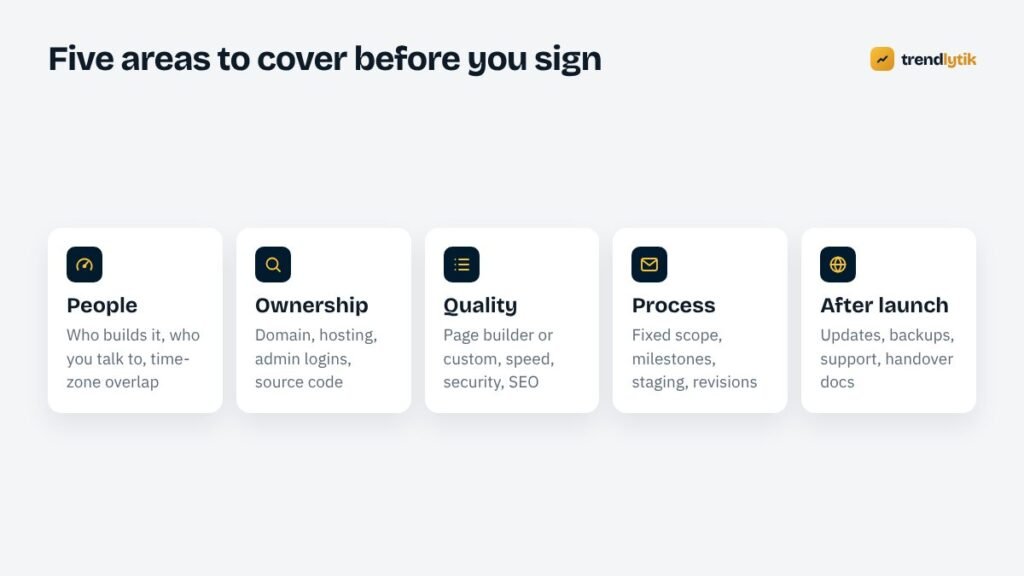
People: who you are really hiring
1. Who will actually build my website?
Agencies and freelancers sometimes subcontract work to other teams. That is not automatically bad, but you deserve to know. Ask who designs, who develops and who you will talk to. Projects run smoothest when you can speak directly with the person writing the code.
2. Can I see live sites you built, not just screenshots?
Screenshots hide everything important. Ask for live links, then open them on your phone. Are they fast? Do the menus work? Does the contact form feel trustworthy? Run one or two through PageSpeed Insights. Ask what exactly the developer did on each project — design, build, or just a few changes.
3. What hours will you be available, and how quickly do you reply?
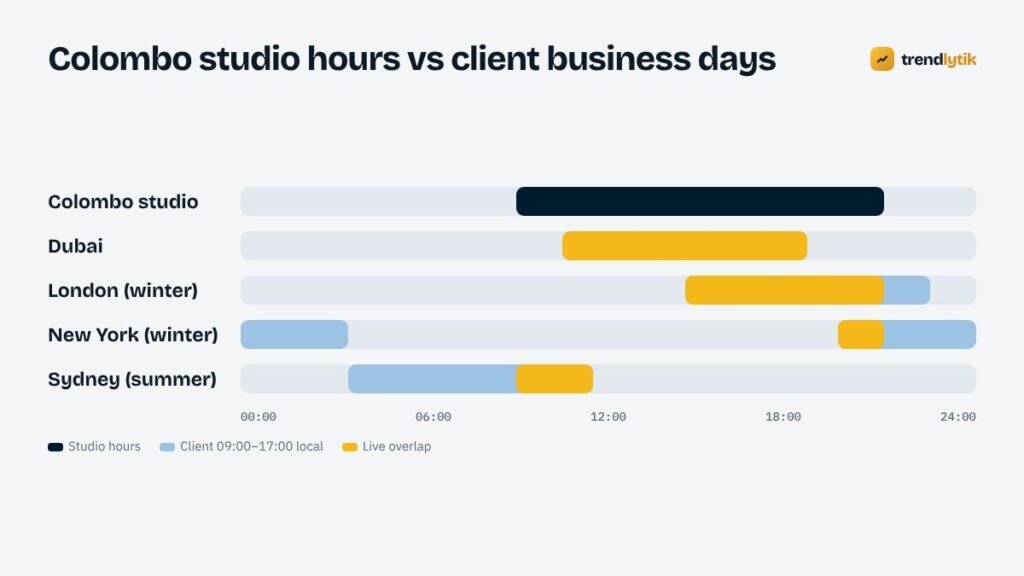
Time zones can be an advantage or a headache. A studio in Colombo working 09:00–21:00 local time, for example, covers the whole Dubai working day, most of the UK day, Australian afternoons and the first hours of the US East Coast morning — and work continues while clients further east or west are asleep. What matters is agreeing when you can reach each other and how fast replies arrive.
Ownership: protecting your business
4. Will the domain and hosting be in my name?
This is the most important question on the list. Your domain name is your identity online. It should be registered in your name, with your email address, and you should have the login. The same goes for hosting. A developer can be given access to both without owning either.
5. Will I have full administrator access?
You should receive an administrator account for WordPress, not just an editor login. You may never use most of the settings, but you should never be locked out of your own site.
6. Who owns the code and design?
WordPress is licensed under the GPL, and themes and plugins built for it generally are too. Ask for written confirmation that you receive the full source code of anything custom-built for you, with no ongoing licence fee to keep using it.
Quality: how the site will perform
7. Will you use a page builder, a pre-made theme or a custom theme?
All three are legitimate, but they lead to very different results. Page builders make editing layouts easy but add code to every page. Pre-made themes are quick and inexpensive but carry features you do not need. Custom themes are built for your content and usually perform best, but cost more upfront. Ask why the developer recommends their approach for your project. We explain our own reasoning in why we build without page builders.
8. How many plugins will the site use, and why?
Every plugin is code that must be updated and secured. A good developer can justify each one. A list of thirty plugins for a brochure site is a warning sign.
9. How will you handle speed?
Listen for specifics: image sizing and compression, caching, limited scripts, self-hosted fonts and testing on real phones. Vague promises of “fast loading” mean nothing. Our guide to Core Web Vitals explains what to look for.
10. What does “SEO-friendly” mean in your build?
At a minimum: clean URLs, one H1 per page, editable titles and meta descriptions, XML sitemaps, structured data for your business and content, image alt text, and a plan for redirects if you are replacing an existing site. If you already rank, ask specifically how they will protect those rankings — see redesigning without losing SEO.
11. How do you approach security?
Good answers include strong passwords and two-factor authentication for admin accounts, minimal plugins, input validation and escaping in custom code, regular updates and off-site backups. Be cautious of anyone who relies entirely on one security plugin.
Process: avoiding surprises
12. What exactly is included in the price?
Ask for a written scope: number of pages and templates, features, rounds of revisions, content entry, training, launch tasks and any third-party costs. Most budget disputes come from assumptions nobody wrote down.
13. How will I see progress?
The best answer is a private staging site you can visit at any time, with regular check-ins at agreed milestones. Paying in stages against delivered milestones protects both sides.
After launch: the part most people forget
14. What happens after the site goes live?
WordPress needs ongoing care: updates to core, themes and plugins, backups, uptime monitoring and occasional fixes. Ask whether the developer offers a maintenance plan, what it includes and what ad-hoc help costs. Our WordPress maintenance checklist shows what good care involves.
15. What will you hand over at the end?
You should receive all logins, a short guide to editing your site, a list of plugins and services used, and access to any accounts created on your behalf (analytics, Search Console, email services). If the developer disappeared tomorrow, another developer should be able to pick up the project.
How to compare proposals fairly
When three proposals arrive with three very different prices, it is tempting to compare the totals. Compare the scope instead. Line them up side by side and check:
- Templates and pages. Is one quote for five pages and another for fifteen? Are blog, portfolio or product templates included?
- Content. Who writes the text, sources the images and enters the content? Content entry alone can take days.
- Features. Forms, bookings, payments, multilingual support, integrations with your CRM or email platform.
- SEO and migration. Is redirect mapping included if you are replacing a site? Structured data? Search Console setup?
- Revisions and timeline. How many rounds of changes, and what happens after that?
- Licences and third-party costs. Premium plugins, fonts, stock images, hosting, email services.
- After-launch support. A warranty period for bugs, training and the cost of ongoing care.
Often the cheapest proposal is cheaper because it leaves things out — and those things come back later as change requests. The most expensive is not automatically the best either. The right proposal is the one whose scope matches what your business needs, explained clearly enough that you could hand it to another developer.
What a good proposal looks like
A trustworthy proposal reads like a plan rather than a sales brochure. It restates your goals in the developer’s own words, lists the pages and features, names the technologies and explains why, breaks the work into milestones with dates and payments, states what is excluded, and describes what happens after launch. If you finish reading it and still cannot say exactly what you are buying, ask for a clearer one.
Red flags to watch for
- Registering your domain or hosting in their own name.
- Refusing administrator access “for your safety”.
- No written scope, or a scope that only says “website”.
- A large upfront payment with no milestones.
- Promises of guaranteed first-page rankings.
- Portfolio sites that are slow, broken or no longer online.
- Reluctance to explain how they will handle your existing rankings.
Green flags
- They ask about your business goals before talking about design.
- They explain trade-offs honestly, including when a cheaper option is enough.
- They put the scope, price and timeline in writing.
- They give you a staging link early and update it often.
- They plan for life after launch.
The questions a good developer will ask you
Interviews work both ways. A developer who cares about results will want to know who your customers are, how they find you today, what a successful enquiry or sale looks like, which competitors you admire or worry about, who will update the site after launch, and what has frustrated you about previous websites. If the conversation jumps straight to colours and fonts without any of this, the site may look good and still fail to bring in business.
Hiring remotely
Many businesses now hire developers in other countries for good reasons: deep experience, competitive rates and working hours that extend the business day. Remote projects succeed for the same reasons local ones do — clear scope, direct communication, staged payments and ownership kept firmly with the client. The questions above protect you wherever your developer lives.
Trendlytik works with clients in Sri Lanka, the UAE, Australia and the United States. You speak directly with the developer, you own everything from day one, and every project starts with a written proposal. Browse our work or ask us these questions yourself.
Questions about this topic.
Is it safe to hire a WordPress developer in another country?
Yes, if you keep ownership of your domain, hosting and logins, agree a written scope and milestones, and pay against delivered work. Those protections matter far more than location.
Should I pay a fixed price or hourly?
Fixed prices suit well-defined projects such as a new website. Hourly or retainer arrangements suit ongoing maintenance and changes that are hard to scope in advance.
What is the biggest red flag?
A developer who wants to register your domain or hosting in their own name, or who will not give you administrator access. Your business should never depend on one person's goodwill to access its own website.