JSON-LD Schema for WordPress Themes: The Types That Actually Matter
You do not need every schema.org type. These are the structured data types we build into every WordPress theme, how to connect them with @id references, how to test them and how to avoid duplicates with SEO plugins.
 pasindukw
· 8 min read

Structured data will not rank a weak page. What it does is help search engines understand a strong one: who publishes it, what kind of page it is, where it sits in the site and which business it belongs to. It also makes pages eligible for rich results such as breadcrumbs in the search listing and product details. That makes it one of the best-value pieces of technical SEO a theme can include. JSON-LD schema is the format we use to provide it.
In this guide
The schema.org vocabulary is enormous, and it is tempting to mark up everything. You do not need to. This guide covers the short list of types we build into every WordPress theme, how to connect them properly and how to keep them accurate.
JSON-LD schema in one paragraph
JSON-LD is a block of structured data placed in a <script type="application/ld+json"> tag, usually in the page head. It describes the page using schema.org types and properties without changing the visible HTML. Google recommends JSON-LD over the older Microdata and RDFa formats, and for theme developers it is much easier to maintain because it lives in one place.
The types that matter for most business sites
Organization (or a more specific type)
One node describes the business: name, URL, logo, contact details, address or area served and social profiles in sameAs. Use a more specific type where it fits. A professional services firm might add ProfessionalService; a local business can use LocalBusiness or a precise subtype such as Plumber, Restaurant or Store. Specific types give search engines a clearer picture.
WebSite
Names the site and links it to its publisher. It is also where you can declare a site search action.
WebPage and its subtypes
Each page gets a node describing itself, linked to the website and to its breadcrumb. Use subtypes where they fit: AboutPage, ContactPage, CollectionPage for archives and SearchResultsPage for search.
BreadcrumbList
Describes the path to the page: Home › The Lab › Category › Article. Google can show this path in place of the raw URL in search results. Generate it from the same function that prints the visible breadcrumbs, so the two never disagree.
BlogPosting or Article
For articles: headline, description, image, publication and modification dates, author and publisher. Accurate dates and a real author matter, because they are part of how readers and search engines judge freshness and credibility.
Service
For service pages, a Service node with the service name, description, area served and the organisation as provider.
Product
For stores, WooCommerce outputs basic Product structured data with price, availability and reviews. Make sure your theme does not output a second, conflicting version.
FAQPage
Marks up question-and-answer content. Google now limits FAQ rich results to a small set of well-known authoritative sites, so most businesses will not see expanded FAQ listings. The markup remains valid and accurately describes the page, so we still include it where an FAQ is visible — but never for hidden or invented questions.
Use one @graph connected by @id

A common mistake is outputting several unconnected blocks, each repeating the business details. A cleaner approach is a single JSON-LD block containing an @graph array, with nodes linked by @id references:
{
  "@context": "https://schema.org",
  "@graph": [
    { "@type": "Organization", "@id": "https://example.com/#organization",
      "name": "Example Studio", "url": "https://example.com/" },
    { "@type": "WebSite", "@id": "https://example.com/#website",
      "url": "https://example.com/",
      "publisher": { "@id": "https://example.com/#organization" } },
    { "@type": "WebPage", "@id": "https://example.com/blog/post/#webpage",
      "isPartOf": { "@id": "https://example.com/#website" },
      "breadcrumb": { "@id": "https://example.com/blog/post/#breadcrumb" } },
    { "@type": "BlogPosting", "@id": "https://example.com/blog/post/#article",
      "mainEntityOfPage": { "@id": "https://example.com/blog/post/#webpage" },
      "publisher": { "@id": "https://example.com/#organization" } }
  ]
}
The business is described once and referenced everywhere else. The result is compact, consistent and easy for search engines to connect.
Which schema goes where

In a WordPress theme, the template hierarchy makes this straightforward. A single function builds the shared nodes — Organization, WebSite, WebPage and BreadcrumbList — and adds a page-specific node based on what is being viewed: is_singular( 'post' ) adds BlogPosting, a service template adds Service, and archives add an ItemList of the posts shown.
Rules that keep structured data trustworthy
- Mark up only what is visible. Structured data must describe content users can see. Hidden FAQs, invented ratings or reviews you collected elsewhere and did not show break Google’s guidelines.
- Never invent reviews or ratings. Self-serving review markup for your own business is not eligible for review rich results anyway, and fake reviews can lead to manual actions.
- Keep it in sync. Pull values from the same fields that render the page — the post title, the excerpt, the featured image, the contact details in the Customizer — so they can never drift apart.
- Use absolute URLs for
url,@idand images. - Prefer fewer, accurate properties over long lists of guesses.
Don’t duplicate your SEO plugin
If Yoast, Rank Math, All in One SEO or SEOPress is active, it already outputs most of this graph. Two different graphs describing the same page confuse more than they help. A well-built theme detects the plugin and steps aside, keeping only markup the plugin cannot know about — for example FAQs stored in custom fields or projects in a custom post type — or extends the plugin’s graph through its filters instead of printing a separate one. The Trendlytik theme does exactly this.
Article authorship and dates
For blogs, two properties carry more weight than most: the author and the dates. Link the author to a real person with a profile page that explains their experience, and keep datePublished fixed while dateModified updates when the article is meaningfully revised. Changing the published date to make old posts look new is misleading and easy for search engines to spot.
How to test
- Rich Results Test from Google shows which rich results a page is eligible for and flags errors.
- Schema Markup Validator at validator.schema.org checks the markup against schema.org generally, including types Google does not use for rich results.
- Search Console enhancement reports show structured data issues across the whole site over time — check them after launches and theme updates.
- View the source and read it. If it does not describe the page accurately to a human, it will not help a search engine.
Adding structured data in a WordPress theme
A tidy implementation keeps all structured data in one place. In our themes, a single function runs on wp_head, builds an array of nodes and prints one JSON-LD block. A filter lets other parts of the theme — packages, FAQs, products — add or modify nodes before output. This has several advantages over scattering <script> tags through template files:
- There is exactly one graph per page, so nodes cannot contradict each other.
- Values come from the same functions that render the page — titles, excerpts, featured images, breadcrumbs — so they stay in sync.
- The whole graph can be switched off with one check when an SEO plugin is active.
- Encoding is handled once, with
wp_json_encode(), which escapes characters safely.
Keep the output compact. Search engines do not need every optional property; they need accurate core properties connected correctly.
Local businesses: details that matter
For local businesses, a few properties deserve extra care because they are compared with other sources such as your Google Business Profile and directory listings:
- Name, address and phone exactly as they appear everywhere else.
- Opening hours using
openingHoursSpecification, updated for seasonal changes. - Area served for service-area businesses that do not receive customers at their premises.
- Geo coordinates where you have a public location.
- Price range as a simple indicator, if relevant.
Inconsistent details across your website, profile and listings make it harder for search engines to trust any of them. Our local SEO guide covers the wider picture.
Common mistakes we fix
- Several Organization nodes with slightly different names or logos.
- Article dates that never change, even after major updates.
- Breadcrumb markup that does not match the visible breadcrumbs.
- Staging-site URLs left in
@idvalues after launch. - Review stars added to service pages with no visible reviews.
- LocalBusiness opening hours that contradict the Google Business Profile.
Keeping structured data healthy over time
Structured data is not a one-off task. It drifts as sites change: a new logo, a new phone number, a moved office, a switched SEO plugin. Build a quick check into your routine maintenance — test the home page, one service page and one article in the Rich Results Test every quarter and after any theme or plugin change — and review the enhancement reports in Search Console monthly. Our WordPress maintenance checklist includes it.
Summary
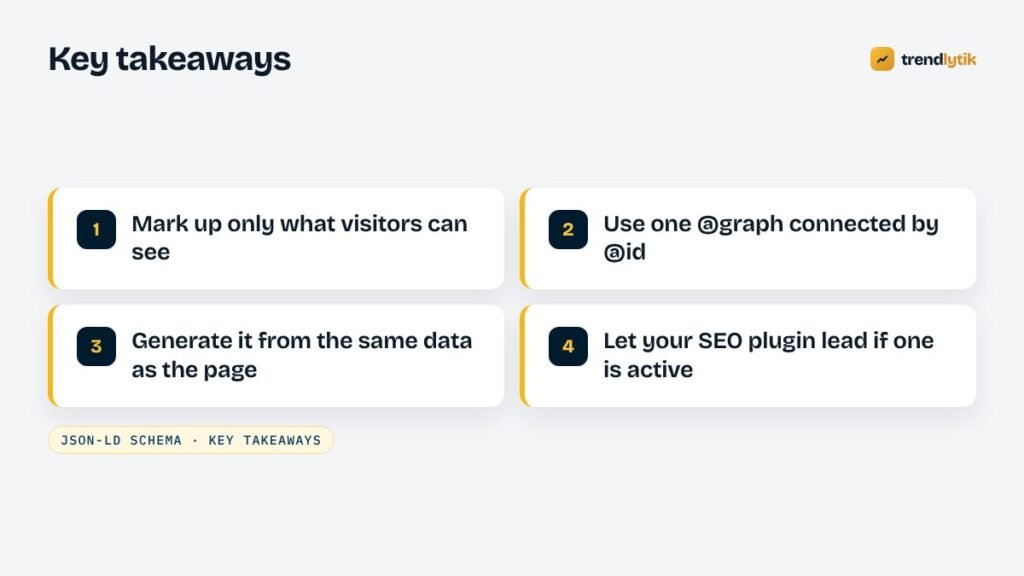
For most business sites, a small, accurate graph is all you need: Organization, WebSite, WebPage, BreadcrumbList and one page-specific type such as BlogPosting, Service or Product, connected by @id and generated from the same data that renders the page. Every theme we build includes it, and our technical SEO service fixes it on existing sites. If you are redesigning, carry structured data over as part of the plan — see how to redesign without losing rankings.
Sources and further reading
- Google: intro to structured data — how Google uses structured data.
- Schema Markup Validator — validate any page against schema.org.
- schema.org — the full vocabulary of types and properties.
Questions about this topic.
Does structured data improve rankings?
Not directly. It helps search engines understand your content and can make pages eligible for rich results such as breadcrumbs and review snippets, which can improve how your listing looks. Relevance and quality still decide rankings.
Should I still add FAQ schema?
Google now shows FAQ rich results only for a small set of well-known authoritative sites, so most sites will not see the expanded listing. The markup is still valid and describes the page accurately, but add it only where the questions and answers are visible on the page.
JSON-LD, Microdata or RDFa — which should I use?
JSON-LD. Google recommends it, it keeps structured data separate from your HTML, and it is far easier to maintain in a theme.