Calling the Claude API from WordPress When Your Host Blocks Outbound Requests
Some shared hosts block or throttle outbound HTTP from PHP, or kill long requests. Here is how we still ship Claude-powered features in wp-admin — server-side when possible, browser-side when not, and safely either way.
 pasindukw
· 8 min read
The textbook way to call an AI API from WordPress is a single wp_remote_post() on the server. On many shared hosting plans, that is exactly what fails. Outbound requests are blocked by a firewall, throttled, or cut off by a short PHP execution limit before a long generation finishes. The user clicks Generate, waits, and gets a blank error. This guide shows how we keep Claude API features working anyway.
In this guide
We build Claude-powered features — writers, product creators, food analyzers, prediction tools — into WordPress sites running on all kinds of hosting, from managed WordPress platforms to inexpensive shared plans. This guide covers the pattern we use to make them work everywhere, and the rules that keep the API key safe.
Why AI calls fail on shared hosting
Three separate limits cause almost every problem, and it helps to know which one you are hitting:
- The WordPress HTTP timeout.
wp_remote_post()waits five seconds by default. A Claude response of several hundred words often takes longer, so the request is abandoned even though the API is working. - The PHP execution limit. Hosts set
max_execution_time— often between 30 and 120 seconds on shared plans — and some also enforce a limit at the web server or proxy. Raising the WordPress timeout does not help if PHP itself is killed first. - Outbound connection rules. Some hosts restrict which external servers PHP may contact, or block outbound connections from certain plans entirely. The request never leaves the server.
Each needs a different fix, so the first step is always to find out which one you have.
Step 1: Diagnose before you design

Build a tiny admin-only diagnostic screen that sends one short request and logs the result: the HTTP status code, the total time taken and any error message from the HTTP layer. Run it a few times at different hours.
$start    = microtime( true );
$response = wp_remote_post(
    'https://api.anthropic.com/v1/messages',
    array(
        'timeout' => 60,
        'headers' => array(
            'x-api-key'         => $key,
            'anthropic-version' => '2023-06-01',
            'content-type'      => 'application/json',
        ),
        'body'    => wp_json_encode( array(
            'model'      => $model,
            'max_tokens' => 50,
            'messages'   => array( array( 'role' => 'user', 'content' => 'Reply with OK.' ) ),
        ) ),
    )
);
$ms = round( ( microtime( true ) - $start ) * 1000 );
// Log is_wp_error( $response ), the status code and $ms.
The results tell you what to build:
- Fast success: server-side calls will work. Use them.
- Success, but slow responses for real tasks: server-side calls will work if each request stays small. Use a queue.
- A connection error such as “could not resolve host” or “connection refused”, while other sites work fine from your own computer: outbound calls are blocked. Ask the host to allow
api.anthropic.com; if they cannot, use the browser fallback.
Step 2: Prefer server-side calls
When the server can reach the API, keep the call on the server. The key never leaves it, scheduled tasks can run without anyone logged in, and you have full control over logging and retries.
Three settings make server-side calls reliable on modest hosting:
- A realistic timeout — long enough for a typical response, comfortably below the PHP limit.
- A sensible
max_tokensso responses cannot grow without limit. Shorter outputs return faster and cost less. - Small units of work. Generate one product description or one article section per request, not twenty.
Step 3: Queue long jobs one item at a time
If an editor wants to generate fifty drafts, never try to do it in one PHP request. Build a queue in the admin: JavaScript sends one item at a time to admin-ajax.php or a REST endpoint, PHP makes one API call and saves one draft, and the browser moves on to the next item while showing progress. Each request finishes quickly, so the host’s limits never come into play. We describe the full pattern in batch processing under a 60-second limit.
Make the queue resumable by marking each item as processed in post meta. If the browser closes halfway, the next run carries on where it stopped.
Step 4: When the server cannot reach the API, call it from the admin browser
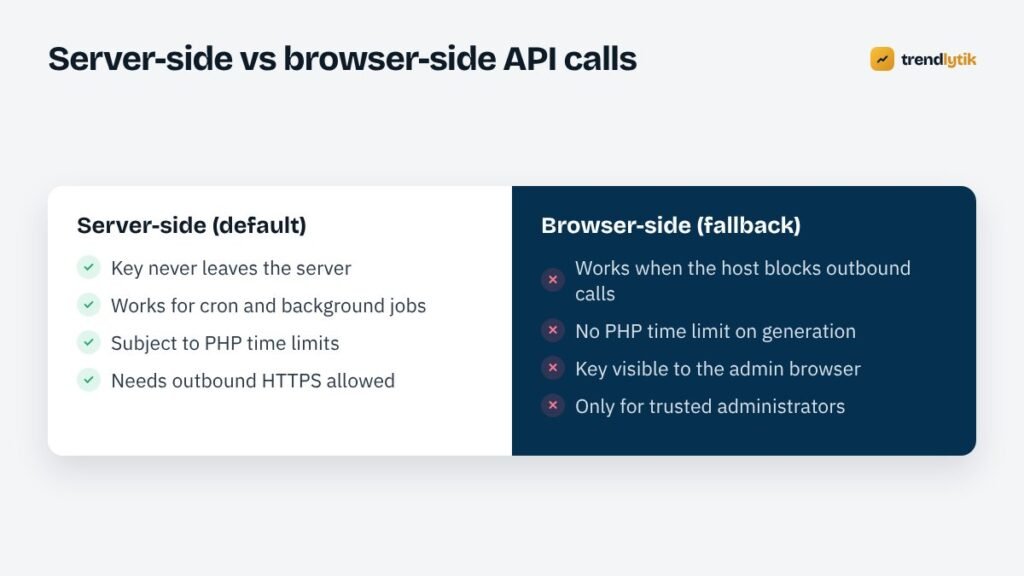
If outbound connections are blocked and the host will not change it, the administrator’s browser can make the request instead, from a screen inside wp-admin. Anthropic supports direct browser access when the request includes the anthropic-dangerous-direct-browser-access: true header. The name is deliberately alarming: any key used in a browser is visible to whoever controls that browser.
That trade-off is acceptable only under strict conditions:
- The tool lives on an admin page that checks
current_user_can( 'manage_options' )before printing anything. - The key is printed only on that screen — never on a public page, never in a script visitors load and never in a REST response anyone can request.
- You use a dedicated API key with a spending limit set in the Anthropic console, so a leaked key has a ceiling.
- Only trusted people hold administrator accounts, and all of them use two-factor authentication.
const res = await fetch('https://api.anthropic.com/v1/messages', {
  method: 'POST',
  headers: {
    'x-api-key': tkSettings.key,              // admin screen only
    'anthropic-version': '2023-06-01',
    'anthropic-dangerous-direct-browser-access': 'true',
    'content-type': 'application/json'
  },
  body: JSON.stringify({ model: tkSettings.model, max_tokens: 1500, messages })
});
const data = await res.json();
Step 5: Save results through WordPress, never directly
Whichever path generated the text, WordPress must be the one that saves it. The browser posts the result back to an AJAX or REST endpoint protected by a nonce and a capability check. PHP then validates and sanitises it before creating or updating anything.
add_action( 'wp_ajax_tk_save_draft', function () {
    check_ajax_referer( 'tk_ai', 'nonce' );
    if ( ! current_user_can( 'edit_posts' ) ) {
        wp_send_json_error( 'forbidden', 403 );
    }
    $title   = sanitize_text_field( wp_unslash( $_POST['title'] ?? '' ) );
    $content = wp_kses_post( wp_unslash( $_POST['content'] ?? '' ) );
    $id      = wp_insert_post( array(
        'post_title'   => $title,
        'post_content' => $content,
        'post_status'  => 'draft',
    ) );
    wp_send_json_success( array( 'id' => $id ) );
} );
Treat AI output like any other untrusted input. wp_kses_post() strips script tags and dangerous attributes; additional checks can reject empty or malformed responses before they create clutter.
Step 6: Guardrails for content quality
A working API call is only half the job. The output has to be accurate and on-brand:
- Give the model the facts — product attributes, source articles, database values — instead of asking it to remember them.
- Write rules into the prompt: no invented statistics, quotes, reviews or claims about the business.
- Run a fabrication check after generation that flags numbers or quotations not present in the inputs.
- Save everything as a draft for a person to review and publish.
We cover these guardrails in depth in practical AI on WordPress.
Keeping costs predictable
AI costs scale with the amount of text sent and received. On WordPress tools, three habits keep the bill boring:
- Pick the model per task. Short structured jobs run well on small, fast models.
- Use prompt caching for long, repeated instructions such as style guides, so they are not paid for in full on every request.
- Log usage per item. The API response reports input and output tokens; store them so you can see cost per article or product.
Common Claude API errors and what they mean
- cURL error 28 (timeout): the WordPress timeout is too short, or the response is too long for it.
- HTTP 401: the key is missing, mistyped or revoked.
- HTTP 429: rate limits reached. Slow the queue and retry after a pause.
- HTTP 529 or other 5xx: a temporary problem on the provider’s side. Retry with a delay.
- A white screen with no error: PHP was killed by the host’s limit. Make the unit of work smaller.
Streaming: nice to have, not essential
The Claude API can stream a response as it is generated, which lets an interface show text appearing word by word. It is a pleasant touch in a chat-style tool, but on shared hosting it adds complexity: PHP output buffering, proxies and caching layers often hold streamed output back until the end anyway. For most WordPress admin tools — where the result is saved as a draft and reviewed later — a normal request with a progress indicator is simpler and just as useful. Add streaming only where people genuinely watch the text arrive.
Where to store the API key
Keep the key out of the theme and out of version control. The most robust option is a constant in wp-config.php, which sits outside the web root on many hosts and is never shown in the dashboard. If editors need to change the key themselves, a settings field in an administrator-only screen is fine — save it with the options API, never echo it back in full, and show only the last few characters so people can tell which key is in use. Never store the key in post meta, a public JavaScript variable or a file inside the uploads folder.
Talk to your host first
Before building a workaround, it is worth one support ticket. Many hosts will allow outbound HTTPS to a specific API domain, raise a timeout for one site, or suggest a plan where these limits do not apply. Share the exact error from your diagnostic screen; it saves a lot of back and forth.

Summary
Test the server first. If it can reach the API, call from PHP with a realistic timeout and small units of work. If requests are long, queue them one at a time. If the host blocks outbound connections, fall back to an admin-only browser call with a restricted key. In every case, save through WordPress with nonces, capability checks and sanitising, and keep a human in the loop.
Want a Claude-powered tool that works on your current hosting? See our Claude AI integration service or describe the task you want to automate.
Sources and further reading
- Claude documentation — the Messages API, models and prompt caching.
- wp_remote_post() — WordPress reference for server-side HTTP requests.
Questions about this topic.
Why does wp_remote_post time out when calling an AI API?
WordPress HTTP requests default to a five-second timeout, and AI responses often take longer. Pass a larger timeout argument, and make sure it stays within your host's PHP execution limit.
Is it safe to call the Claude API from the browser?
Only from admin screens restricted to trusted administrators, with a dedicated key that has a spending limit. Never expose the key on public pages or in front-end scripts that visitors load.
Which Claude model should I use in WordPress?
Use the smallest model that does the job well. Short, structured tasks run well on fast, inexpensive models; long-form writing and complex reasoning justify a larger one. Check Anthropic's documentation for current model names.



1 comment