When Bing Sends More Traffic Than Google: A Practical Playbook
For some sites, Bing, Yahoo and DuckDuckGo send more visitors than Google. How to set up Bing Webmaster Tools, IndexNow and Bing Places, and write content that wins on Bing without hurting Google.
 pasindukw
· 7 min read

It surprises many site owners: their analytics show more visitors from Bing, Yahoo and DuckDuckGo than from Google. We saw exactly that on NutrientsCalculator, where Google sent a trickle of impressions while Bing and its partners sent most of the search traffic. Rather than fight it, we leaned in — across our whole family of niche sites — and the lessons apply to any site, especially newer ones. A big part of our approach is IndexNow, which tells Bing about new pages the moment they change.
In this guide
This playbook covers why Bing matters more than its market share suggests, the tools to set up, how IndexNow works and how to write content that does well on Bing without compromising Google.
Why Bing reaches further than you think

Bing’s own share of searches is smaller than Google’s, but its index feeds far more than bing.com. Yahoo’s web results come from Bing, DuckDuckGo draws heavily on Bing among its sources, Microsoft Copilot uses Bing to ground its answers, and Windows search surfaces Bing results. A page that ranks well in Bing can therefore appear in several places at once — including AI-generated answers that cite sources.
Bing’s audience also skews differently. Desktop users, office workers on Windows machines and people using Edge as their default browser all reach Bing without choosing it. For B2B services, older audiences and some niches, that adds up to a meaningful share of visitors.
Why a newer site might do better on Bing first
Google is famously cautious with new sites: it can take many months to build enough trust signals to rank for competitive terms. In our experience Bing often indexes and ranks clear, well-structured pages from newer sites sooner, especially when they are submitted directly through its tools. That makes Bing a valuable early source of traffic — and of data about which pages and topics resonate.
Step 1: Set up Bing Webmaster Tools
If you already use Google Search Console, setup takes a couple of minutes: Bing Webmaster Tools can import your verified sites directly. Once inside:
- Submit your XML sitemap. WordPress generates one at
/wp-sitemap.xmlby default, or your SEO plugin provides its own. - Check Site Explorer for crawl errors, redirects and blocked URLs.
- Review the SEO reports, which flag missing meta descriptions, duplicate titles, oversized pages and similar issues across the site.
- Use URL Inspection to see how Bing sees a specific page and request indexing.
- Watch the Search Performance report to find queries where you appear but rarely get clicks — prime candidates for better titles and descriptions.
Step 2: Turn on IndexNow
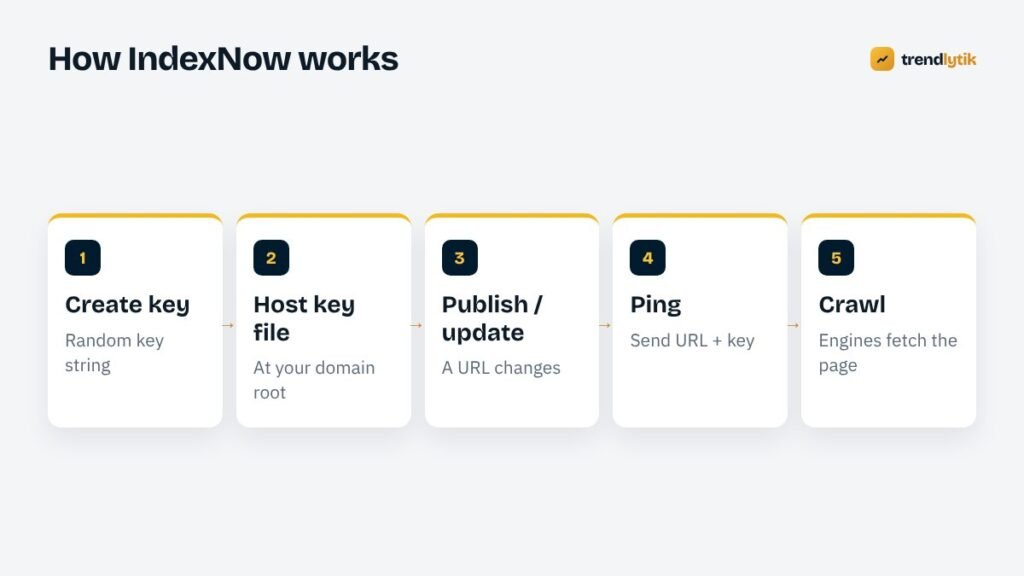
IndexNow is an open protocol that lets your site notify participating search engines the moment a URL is published, updated or deleted. Instead of waiting for a crawler to stumble across changes, you tell it directly. Bing, Yandex, Seznam, Naver and others participate, and a submission to one is shared with the rest. Google does not currently use it.
Setting it up involves three parts:
- Generate a key — a random string of letters and numbers.
- Host the key file at your domain root, for example
https://example.com/your-key.txt, containing the key. This proves you control the site. - Ping on change. When a post is published or updated, send its URL and your key to an IndexNow endpoint.
add_action( 'transition_post_status', function ( $new, $old, $post ) {
    if ( 'publish' !== $new || wp_is_post_revision( $post ) ) {
        return;
    }
    $url = get_permalink( $post );
    wp_remote_get(
        add_query_arg(
            array( 'url' => $url, 'key' => TK_INDEXNOW_KEY ),
            'https://api.indexnow.org/indexnow'
        ),
        array( 'timeout' => 5, 'blocking' => false )
    );
}, 10, 3 );
Several SEO plugins and some CDNs offer IndexNow with a checkbox, which is perfectly fine. We build it into themes and content plugins where we publish many pages automatically — on CricGuides, for example, prediction pages ping IndexNow the moment they go live.
Only submit URLs that have genuinely changed. Pinging unchanged pages over and over does not help and may reduce how seriously the submissions are treated.
Step 3: Claim Bing Places for local businesses
If you serve a local area, Bing Places for Business is the equivalent of Google Business Profile. It can import your Google listing, so setup is quick. Keep your name, address, phone and hours identical across both — our local SEO guide explains why consistency matters.
Step 4: Write for clear answers
Bing and the assistants built on it favour pages that answer a question plainly and then back it up. In practice that means:
- Descriptive titles that say exactly what the page is about. Bing tends to reward exact, literal relevance in titles and headings more visibly than Google does.
- A direct answer near the top, followed by detail, examples and context.
- Logical headings that work as a table of contents.
- Tools and calculators where they help. Interactive pages — calculators, checkers, planners — have performed especially well for us on Bing.
- FAQ sections answering the follow-up questions people actually ask.
- Clear authorship and dates, so readers and search engines can judge credibility and freshness.
Step 5: Get the technical basics right
- Meta descriptions: Bing’s reports flag missing ones prominently. Write a specific description for every important page.
- Structured data: Bing reads schema.org markup too. See our guide to JSON-LD for WordPress themes.
- Fast, lightweight pages: large pages can be crawled less completely.
- Clean redirects and canonicals: conflicting signals slow everything down.
- Social signals and brand mentions: Bing has said it takes social signals into account more openly than Google. Sharing new articles on social platforms you genuinely use does no harm and may help.
Common Bing problems and fixes
“Discovered but not crawled”
Bing knows the URL exists but has not fetched it yet. Make sure the page is in your sitemap, linked from other pages on your site and submitted through IndexNow. Thin or near-duplicate pages may stay in this state for a long time; improving them is more effective than resubmitting.
Pages crawled but not indexed
Bing has looked at the page and decided not to include it, often because it adds little beyond other pages — on your site or elsewhere. Combine overlapping pages, add genuinely useful detail, and check that the page is not blocked by a stray noindex tag or canonical pointing somewhere else.
Sudden drops across the site
Check Bing Webmaster Tools for messages first. Then check robots.txt, recent redirects, server errors and whether a plugin update changed your canonical or robots tags. Big drops are usually technical, not penalties.
Crawl load on small hosting
If Bing’s crawler is putting noticeable load on a small server, use the Crawl Control setting in Bing Webmaster Tools to shift crawling to quieter hours rather than blocking it.
What not to do
- Do not mass-produce thin pages to target every keyword variation. Bing’s guidelines, like Google’s, treat this as low-quality content.
- Do not ping IndexNow for every page on every visit or for unchanged content.
- Do not keyword-stuff titles just because Bing values literal relevance. Write for people first.
- Do not buy links. Bing penalises link schemes too.
Measuring Bing traffic properly
In analytics, group Bing, Yahoo, DuckDuckGo, Ecosia and other Bing-powered engines together to see the full picture. Copilot and other AI assistants may appear as referrals rather than organic search. Compare landing pages by source: you will often find that some topics perform far better on Bing than on Google, which is useful when deciding what to write next.
Bing and AI answers
Because Copilot grounds many of its answers in Bing results, pages that rank on Bing can be cited directly in AI responses, with a link. The pages that tend to be cited share a few traits: they answer a specific question clearly in the first paragraph, use precise headings, include concrete details such as steps, numbers and examples, and come from sites with clear authorship. Writing that way helps people first — and happens to suit AI summaries too.
Keep Google in the loop
Focusing on Bing does not mean ignoring Google. Clean technical SEO, fast pages and genuinely useful content serve both. Keep Search Console set up, keep submitting sitemaps and keep earning links from relevant sites. Many sites that start strong on Bing see Google catch up as their reputation grows.
In short: build for people, verify with both search engines and let each one’s data guide the next page you write.
A 2-week Bing checklist
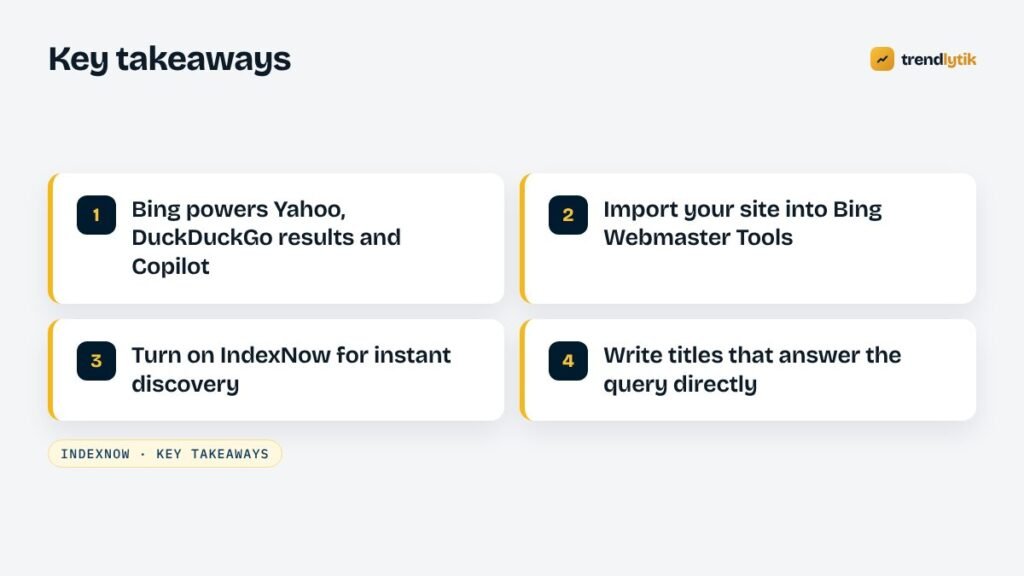
- Import your site into Bing Webmaster Tools and submit the sitemap.
- Fix the top issues in its SEO reports — usually titles and meta descriptions.
- Turn on IndexNow through your theme, plugin or CDN.
- Claim Bing Places if you serve a local area.
- Rewrite titles and introductions on your top ten pages to answer the query directly.
- Group Bing-powered engines in analytics and review the results monthly.
Our technical SEO service sets up Bing and Google side by side, including IndexNow. If your search traffic is not what it should be, ask us for an audit.
Sources and further reading
- IndexNow — the open protocol and its documentation.
- Bing Webmaster Tools — submit sitemaps and see Bing search performance.
Questions about this topic.
Does IndexNow help with Google?
Google does not currently use IndexNow. Keep submitting sitemaps in Google Search Console and earning links; IndexNow is for Bing, Yandex and other participating engines.
How long does Bing take to index a new page?
With IndexNow and a healthy site, new pages are often crawled within hours. Indexing and ranking still depend on quality, so a page that is crawled quickly is not guaranteed to appear.
Will optimising for Bing hurt my Google rankings?
No. Both reward clear, helpful, fast pages with accurate technical SEO. The differences are mostly in tools and emphasis, not in conflicting rules.