Plan Your Website Content Before the Design: A Step-by-Step Guide
Content is the most common reason website projects run late. How to plan pages, write a sitemap, gather what you need and brief your developer — so the design fits your content, not the other way round.
 pasindukw
· 7 min read
Ask any web developer what delays projects most, and the answer is rarely code. It is content. The design is approved, the templates are built, and then everyone waits for the about page, the service descriptions, the photos and the team bios. When content finally arrives, it often does not fit the design: the headline is twice as long, there are six services instead of four and nobody has photos of the work. Planning website content first avoids all of that.
In this guide
Planning content first avoids all of that. It produces better designs, faster launches and pages that actually say what customers need to hear. This guide walks through the process we use with clients before a single pixel is designed.
Why content comes first
A website’s job is to communicate: what you do, who you do it for, why you are the right choice and how to get in touch. Design exists to make that communication clear and attractive. When the design comes first, content is forced into placeholder shapes — three equal boxes, a short slogan, a single paragraph. When content comes first, the design is shaped around what you genuinely need to say, and the result reads naturally.
Content-first planning also exposes questions early. Do we really have six services, or three services with variations? Do we have proof — projects, reviews, photos — for each one? Who will write the blog? Answering these before design saves expensive changes later.
The five planning steps

Step 1: Set goals
Write down what the website must achieve in the next twelve months. Be specific: “receive 20 quote requests a month from homeowners in our area”, “sell our products to customers outside Colombo”, “make it easy for parents to find our learning activities”. Goals decide which pages matter most and what each page asks the visitor to do.
Step 2: Understand your audience
List the main types of visitor and, for each one, the questions they need answered before they act. A homeowner looking for a repair wants to know whether you cover their area, how quickly you can come and roughly what it costs. A business looking for a web developer wants examples, process and price. The best source of these questions is your own inbox: what do customers ask on the phone, by email and in person?
Step 3: Draw the sitemap
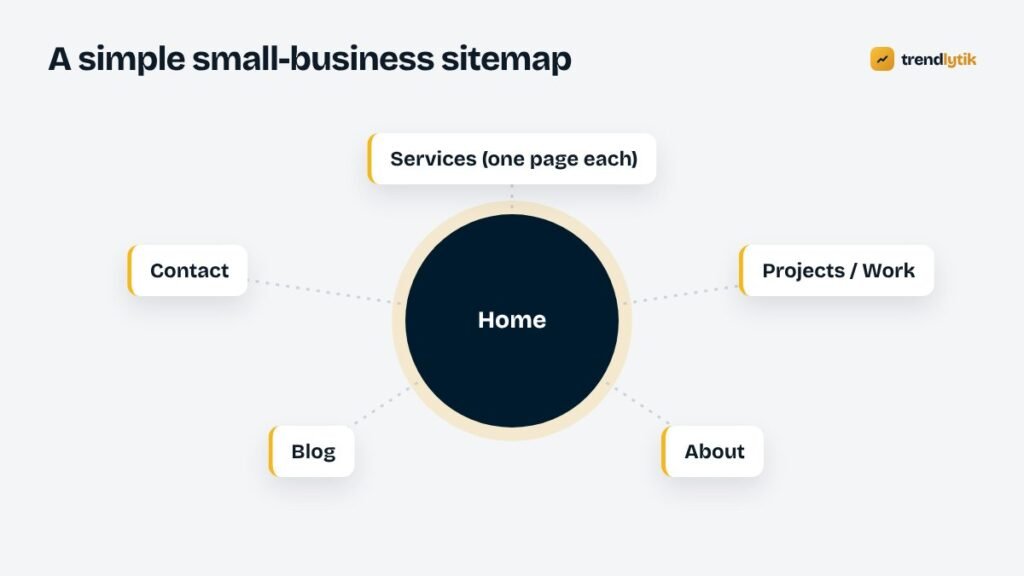
A sitemap is simply a list of pages and how they connect. For most small businesses it is short:
- Home — a summary of who you are, what you do and why to choose you, with routes to everything else.
- Services — an overview plus one page per main service. Our guide to writing service pages that convert shows what each should contain.
- Projects or work — examples and case studies.
- About — your story, your team and why you do this.
- Blog — articles answering customer questions.
- Contact — every way to reach you, plus a short form.
- Legal pages — privacy policy and, if relevant, terms, returns and shipping.
Resist adding pages “just in case”. Every page should have a clear purpose and an audience. You can add more later.
Step 4: Write a brief for each page
Before writing full text, write a short brief for each page:
- Purpose: what this page must achieve.
- Audience: who arrives here and what they want to know.
- Key messages: three to five points the page must get across.
- Proof: projects, reviews, numbers or photos that support those messages.
- Call to action: the one thing a visitor should do next.
- Search topic: the main phrase people would use to find this page.
These briefs become the blueprint for both the writer and the designer.
Step 5: Gather the materials
With briefs in hand, collect what each page needs:
- Text — written or drafted for each page.
- Photos — your work, your premises, your team, your products. Real photos beat stock images for trust.
- Logo and brand assets in high quality.
- Reviews and testimonials, with permission and ideally a link to the original.
- Project details — what you did, for whom, and results you can share.
- Practical information — opening hours, service areas, prices or price factors, policies.
Writing tips for business websites
- Write the way you speak to customers. Plain words beat marketing language.
- Lead with the customer, not yourself. Start with their problem and the outcome you deliver.
- Be specific. “Most repairs done on the first visit” is more persuasive than “fast, reliable service”.
- Use headings and lists so people can scan.
- Keep paragraphs short, especially for mobile readers.
- Answer price questions as openly as you can.
- End every page with a next step.
Using AI to help — carefully
AI writing tools can speed up content planning: turning your rough notes into an outline, suggesting questions customers might ask, or tidying a draft. They cannot know your business, your results or your customers. Use them to work faster from your own material, then rewrite in your voice and check every fact. Never let AI invent testimonials, statistics or claims. We explain safe ways to use AI in practical AI for WordPress.
Planning content for search
Content planning and SEO are the same exercise seen from two angles. When each page has a clear topic, answers real questions and links logically to related pages, it is easier for both people and search engines to understand. Plan your first blog articles around the questions customers ask most, and link them to the relevant service pages. Our SEO checklist for a new website covers the technical side.
Sharing the plan with your developer
A simple shared document or spreadsheet with your sitemap, page briefs and links to gathered materials is enough. With it, a developer can design templates that fit your real content, estimate accurately and avoid surprises. It also speeds up quotes: our guide to website costs explains how scope affects price.
An example: planning a food truck website
Here is how the process looks for a small business — a food truck that wants more orders and catering enquiries.
- Goal: more online orders through delivery apps, plus five catering enquiries a month.
- Audience: hungry locals on phones who want the menu and a way to order; event organisers who want catering details.
- Sitemap: Home (menu highlights, where to find us today, order button), Menu, Catering & Events, About, Contact.
- Home page brief: purpose — get people ordering; key messages — the cuisine, the family story, where and when; proof — food photos and reviews; call to action — Order.
- Materials: the full menu with descriptions and dietary notes, ten good food photos, ordering links, opening hours, the family’s story in a few paragraphs, catering options and minimum order sizes.
With that plan, the design almost designs itself: a big order button, a menu that reads well on phones, a clear catering section. Our article on restaurant and food truck websites covers the details.
Who owns the content?
Decide early who is responsible for each piece of content, both before launch and afterwards. In small businesses it is often the owner, who is also the busiest person. If that is you, block time in your calendar for writing, or budget for a writer who interviews you and drafts the pages. Content with no owner is the content that never arrives.
Common website content mistakes
- Waiting until the design is finished to start writing.
- Copying text from competitors or suppliers.
- Pages that talk only about the company’s history and values.
- One page trying to cover every service.
- No proof — only claims.
- Placeholder text left on a live site.
- Forgetting to plan who will keep content up to date after launch.
A final check before handing content over: read every page aloud. Anything that sounds awkward spoken will read awkwardly too.
After launch: keep content alive
A website is never finished. Add new projects as you complete them, refresh service pages with new questions customers ask, update prices and photos, and publish articles regularly. A small, steady routine — one update a week — keeps the site accurate and gives search engines reasons to return.

A content planning template
- Goals for the next 12 months.
- Visitor types and their top questions.
- Sitemap with every page listed.
- A brief for each page: purpose, audience, messages, proof, call to action, search topic.
- Materials checklist: text, photos, logo, reviews, projects, practical details.
- Owner and deadline for each item.
- Plan for updates after launch.
Every project we take on starts with a short planning session like this. If you would like help turning your ideas into a sitemap and page briefs, get in touch or explore our packages.
Sources and further reading
- Google: creating helpful content — people-first content guidance.
- Google SEO Starter Guide — how site structure helps search engines.
Questions about this topic.
Should I write content before or after the design?
Before, or at least alongside. Designing around real content produces pages that fit what you need to say. Designing first often leads to text squeezed into boxes that were never meant for it.
How many pages does a small business website need?
Usually fewer than people think: a home page, one page per main service, an about page, a contact page and perhaps a portfolio and blog. Add pages when they serve a clear purpose.
Can AI write my website content?
AI can help draft, outline and edit, but it does not know your business, customers or results. Use it to speed up a first draft from your own notes, then rewrite in your voice and check every fact.