SEO Checklist for a New Website: 30 Steps Before and After Launch
A practical SEO checklist for new websites: research, structure, on-page basics, technical setup, launch-day tasks and the first ninety days — so your new site gets found from the start.
 pasindukw
· 7 min read
A new website starts with no history in search engines: no links, no rankings and no record of what it is about. That makes the first few months important. Decisions made before and around launch — how pages are structured, what they are called, how quickly search engines discover them — shape how fast the site starts bringing in visitors. This SEO checklist covers every one of them.
In this guide
This checklist covers thirty steps across four phases, from planning to the first ninety days. It is the checklist we run on every site we launch, whether it is a three-page starter site or a large content platform.

Phase 1: Plan (steps 1–7)
- Define who the site is for. Describe your ideal customers and the problems they search about. Every later decision follows from this.
- List the searches that matter. Write down how customers describe your services, products and problems in their own words. Free tools such as Google’s autocomplete, the “People also ask” box and Search Console data from any existing site help.
- Map one main topic to each page. Each important search intent should have one clear page. Two pages chasing the same topic compete with each other.
- Plan a simple structure. Home, services (one page per main service), projects or products, about, contact, and a blog. Keep important pages within a click or two of the home page.
- Choose clean URLs. Short, readable and descriptive:
/services/fridge-repair/rather than/?page_id=42. Decide them now, because changing them later needs redirects. - Plan your first articles. Pick five to ten genuinely useful topics your customers ask about. Our guide to planning website content helps.
- Check the domain. If it was used before, look at what it hosted. A domain with a spammy past can carry problems.
Phase 2: Build (steps 8–20)
On-page basics
- Write a unique title for every page, roughly 50–60 characters, with the main topic near the start.
- Write a unique meta description that summarises the page and invites the click.
- Use one H1 per page that clearly states the topic, then logical H2 and H3 headings.
- Write genuinely useful content. Answer the questions customers ask, in more depth and more clearly than the alternatives. Avoid thin pages that exist only to target a keyword.
- Add descriptive alt text to meaningful images, and use sensible file names.
- Link related pages together with descriptive anchor text — services to projects, articles to services.
Technical basics
- Use HTTPS everywhere and redirect every variation (http, www or non-www) to one preferred version.
- Make every page mobile-friendly. Google indexes the mobile version of your site.
- Make pages fast. Compress images, limit scripts, self-host fonts and use caching. See Core Web Vitals explained.
- Add structured data for your organisation, pages, breadcrumbs, services and articles. See JSON-LD for WordPress themes.
- Generate an XML sitemap. WordPress creates one at
/wp-sitemap.xml; SEO plugins provide their own. - Check robots.txt does not block important pages or resources.
- Remove or noindex thin pages such as empty tag archives, attachment pages and test pages.
Phase 3: Launch (steps 21–26)
- Turn off “Discourage search engines from indexing this site” in WordPress under Settings → Reading. This single checkbox is the most common launch mistake we see.
- Verify the site in Google Search Console and submit the sitemap.
- Verify in Bing Webmaster Tools — you can import from Search Console — and turn on IndexNow. See our Bing playbook.
- Set up analytics and conversion tracking, so you can measure enquiries, not just visits.
- Create or update your Google Business Profile and Bing Places listing if you serve a local area, linking to the new site.
- Replace the old site carefully, if there was one: redirect every old URL. Our guide to redesigning without losing rankings explains how.
Phase 4: The first 90 days (steps 27–30)
- Check indexing weekly. Use the Pages report in Search Console to see which pages are indexed and why others are not.
- Publish consistently. One helpful article every week or two builds topical depth and gives search engines reasons to return.
- Earn genuine mentions and links: industry associations, suppliers, partners, local organisations, guest articles and press. Avoid buying links.
- Collect reviews from real customers on your Google profile and relevant platforms.
Writing titles and descriptions that earn clicks
Titles and meta descriptions are your listing in the search results — the first impression most people get of your site. A few principles make them work harder:
- Lead with what the searcher wants, not your brand. “Fridge Repair in Portland — Same-Day Visits | All Fixed” beats “All Fixed | Home | Welcome”.
- Be specific. Numbers, locations and concrete benefits stand out among generic results.
- Match the page. If the title promises a checklist, the page should deliver one. Misleading titles bring clicks that bounce straight back.
- Keep them unique. Duplicate titles across pages make it harder for search engines to choose which page to show.
Search engines sometimes rewrite titles and descriptions when they think another wording matches the query better. Clear, accurate titles are rewritten less often.
Internal linking from day one
New pages are discovered mostly through links. Link every new article from at least one relevant service page or older article, and link from articles back to the services they relate to. A short “related reading” section and links within the text do more than a long footer full of links. Internal links also show search engines which pages you consider most important — the ones you link to most.
Free tools you need
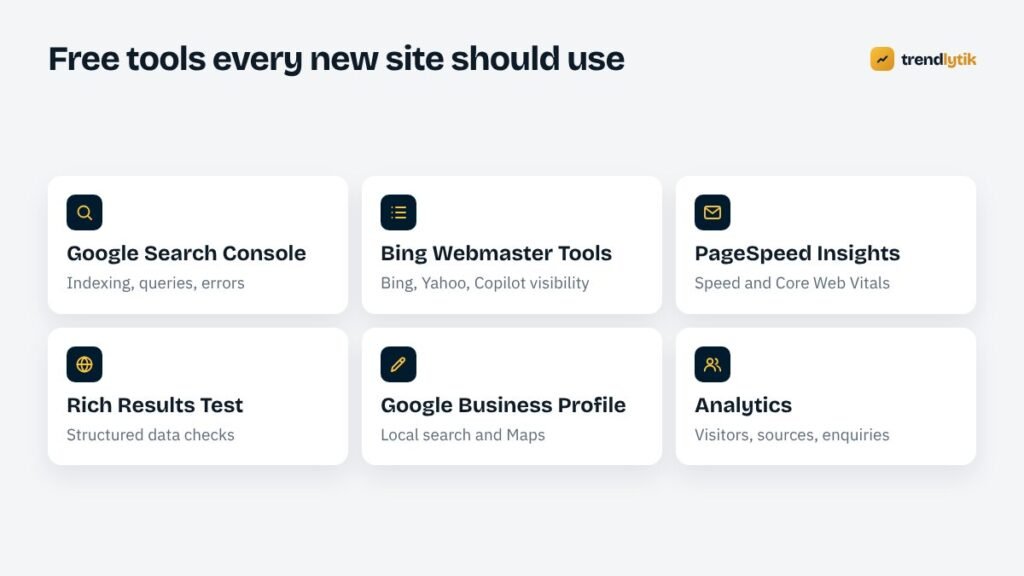
None of the steps above requires paid software. Google Search Console, Bing Webmaster Tools, PageSpeed Insights, the Rich Results Test, Google Business Profile and a privacy-friendly analytics setup cover everything a new small-business site needs. Paid SEO suites are useful later for research and competitor analysis, but they are not a prerequisite.
What to expect in the first months
New sites rarely rank for competitive terms quickly. A realistic pattern is:
- First weeks: pages are discovered and indexed; the site appears for its own name.
- First months: impressions grow for specific, long-tail searches, often on Bing before Google.
- Later: as content grows and reputation builds, rankings for broader searches improve.
Patience matters: resist rewriting everything in the first few weeks before search engines have had time to assess the site. Watch impressions in Search Console as an early signal. Clicks follow impressions, and enquiries follow clicks.
Common mistakes on new sites
- Launching with “discourage search engines” still switched on.
- Leaving the staging site indexable, creating a duplicate of the whole site.
- Copying service descriptions from competitors or manufacturers.
- Dozens of thin location pages with only the town name changed.
- No internal links to new articles, so they are hard to discover.
- Huge uncompressed images on the home page.
- Waiting for the site to be “finished” before publishing any content.
Local businesses: a few extra steps
If you serve customers in a particular area, local signals matter as much as on-page SEO. Put your business name, address or service area and phone number in the footer of every page, exactly as they appear on your Google Business Profile. Add LocalBusiness structured data. Create a page for each main service, mention the areas you cover in plain text, and ask early customers for reviews. Our local SEO guide covers the rest.
Content beats tricks
It is tempting to look for shortcuts — keyword-stuffed titles, mass-produced articles, link packages. They do not build lasting results, and some of them break search engine policies. What works is slower and more reliable: pages that answer real questions thoroughly, a site that is fast and easy to use, accurate structured data and a growing reputation among customers and your industry.
When to review the SEO checklist again
Run through the technical items again whenever something significant changes: a new theme, a new SEO plugin, a domain or hosting move, or a major restructure. Most traffic drops we investigate on established sites trace back to one of those moments, and to a single setting that changed without anyone noticing.
A note on AI search
Search engines increasingly show AI-generated summaries, and assistants cite web pages in their answers. The same fundamentals apply: clear, specific, well-structured pages from credible sources are the ones that get summarised and linked. Write for people, describe your business accurately and keep your information consistent across the web.

Let us handle the technical side
Every site we build includes the technical items on this list — structured data, sitemaps, clean URLs, fast templates, Search Console and Bing setup — so you can focus on content and customers. See our packages, or ask for a launch review if your site is already live.
Sources and further reading
- Google SEO Starter Guide — Google's own introduction to SEO.
- Google Search Console — monitor indexing and search performance.
- Bing Webmaster Tools — the Bing equivalent, with IndexNow support.
Questions about this topic.
How long does it take for a new website to rank?
New pages can be indexed within days, but ranking for competitive searches usually takes months of consistent, helpful content and growing reputation. Branded searches and very specific local searches often come first.
Do I need an SEO plugin?
Not necessarily. A well-built theme can handle titles, meta descriptions, structured data, breadcrumbs and sitemaps. Many people still use an SEO plugin for convenience; just avoid having both output the same things.
Should I submit my site to search engines manually?
Verify your site in Google Search Console and Bing Webmaster Tools and submit your XML sitemap there. That is all the submission you need; paid directory submission services are not worth it.