WordPress vs Wix vs Shopify: Which Is Right for Your Small Business?
An honest comparison of WordPress, Wix and Shopify for small businesses: ownership, flexibility, SEO, ecommerce, costs over time and how hard it is to move later — with a simple way to choose.
 pasindukw
· 7 min read
Choosing a website platform is one of those decisions that seems small at the start and turns out to be very hard to change later. Pick the right one and it quietly supports your business for years. Pick the wrong one and you will eventually pay to rebuild the whole site somewhere else. This WordPress vs Wix vs Shopify comparison will help you choose.
In this guide
WordPress, Wix and Shopify are the three platforms small businesses ask us about most. We build on WordPress, so we are not neutral — but every platform has a place, and we regularly tell people when WordPress is not the best fit. This comparison sets out the honest trade-offs.
First, which WordPress?
There are two things called WordPress. WordPress.org is the free, open-source software you install on hosting of your choice — this is what most professional sites use, and what this article means by “WordPress”. WordPress.com is a hosted service run by Automattic that uses the same software with plans and limits, closer to Wix in how it works. When a developer says they build on WordPress, they almost always mean the self-hosted version.
The platforms in one paragraph each
WordPress
Open-source software that powers a very large share of the web. You choose your hosting, your theme and your plugins, and you own everything. It can be a simple brochure site, a large publication, a store with WooCommerce or a custom application. The trade-off: you, or your developer, are responsible for hosting, updates, security and backups.
Wix
An all-in-one hosted website builder with a drag-and-drop editor. Hosting, security and updates are handled for you, and you pay a monthly or yearly subscription. It is easy to start with and good for small, simple sites. The trade-offs: less control over code and structure, and your site cannot be exported to run elsewhere.
Shopify
A hosted ecommerce platform built specifically for selling. It handles products, checkout, payments, hosting and security, with a large app store for extra features. It is excellent for businesses whose website is mainly a store. The trade-offs: monthly subscription plus app costs, transaction fees on some setups, and content features that are more limited than WordPress.
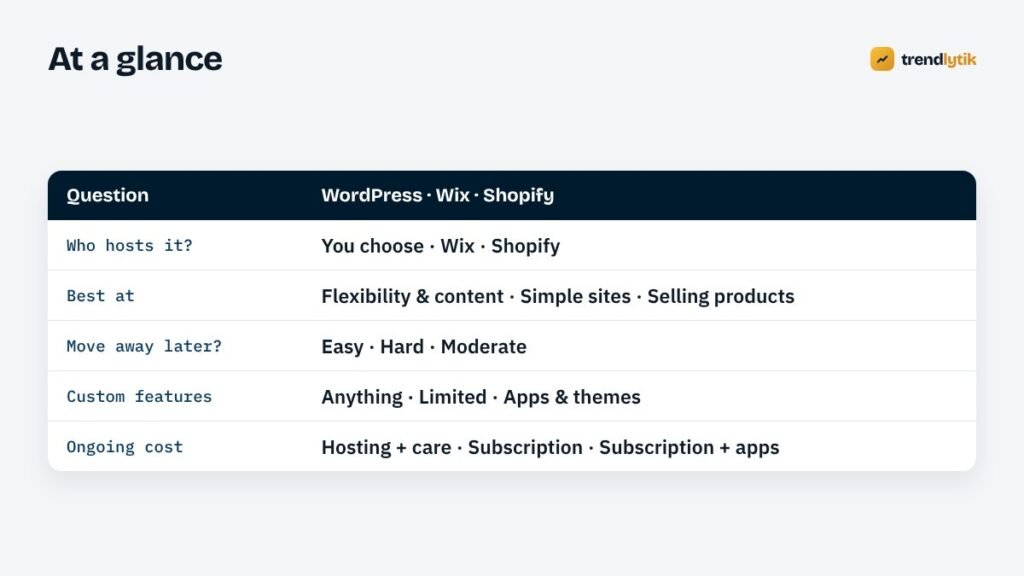
WordPress vs Wix vs Shopify at a glance
Ownership and portability
This is the factor most people overlook, and the one that matters most in five years’ time.
- WordPress: you own the files and the database. You can move to a different host in an afternoon, hire any WordPress developer and export your content in standard formats.
- Wix: your site lives on Wix. You can leave, but you cannot take the site with you — moving means rebuilding the design and moving content page by page.
- Shopify: products, customers and orders can be exported as files, so moving a store is possible, but the design, apps and many settings must be rebuilt on the new platform.
If there is any chance your website will grow into something bigger, portability is worth a lot.
Flexibility and custom features
WordPress can do almost anything, because developers can write custom themes and plugins. We have built booking calendars, route planners, nutrition calculators, AI writing tools and shipping systems on it — see our work for examples. Wix offers apps and some custom code, but within the limits of its platform. Shopify is highly extensible for commerce through apps and themes, and less flexible for things that are not about selling.
SEO
All three can rank well, and content quality matters more than the platform for most small sites. The differences show up as a site grows:
- WordPress gives full control over URLs, templates, structured data, internal linking, page speed and content structure. That control matters for content-heavy and competitive sites.
- Wix has improved its SEO tools considerably and covers the basics well, with less control over technical details.
- Shopify handles product SEO well. Its URL structure includes fixed prefixes such as
/products/and/collections/, and blogging features are more basic.
For local service businesses, the platform matters less than doing the fundamentals in our local SEO guide.
Ecommerce
If selling products is the heart of your business, the real choice is usually Shopify or WooCommerce (the ecommerce plugin for WordPress).
- Shopify is the easier path: a reliable hosted checkout, many payment options and little technical maintenance. Costs grow with apps and, on some setups, transaction fees.
- WooCommerce gives full control: any design, custom shipping and pricing rules, deep integration with your content and no platform transaction fees — but you manage hosting, updates and security, or pay someone to. See our WooCommerce launch checklist.
Wix also offers online stores, which suit small catalogues well.
Ease of use
Wix is the easiest to start with if you are building the site yourself. Shopify is easy for store management. WordPress has a steeper start, but a well-built custom theme makes everyday editing simple: structured fields for services and products, the block editor for articles and the Customizer for homepage content.
Cost over time
Compare the total over three years, not the first month:
- WordPress: hosting, domain, any premium licences and maintenance — plus the initial build if you hire a developer.
- Wix: the subscription, which rises with plan level, plus any premium apps.
- Shopify: the subscription, paid apps, theme costs and any transaction or payment fees.
For a simple site you build yourself, a builder can be cheapest. For a site that needs custom features or will grow, WordPress often costs less over time and avoids a costly rebuild later. Our guide to website costs breaks the numbers down.
Maintenance and security
Wix and Shopify take care of security, updates and hosting for you — a genuine advantage for owners who want nothing to do with technical work. WordPress needs regular updates, backups and monitoring. Done properly, it is secure and reliable; neglected, it becomes vulnerable. Our maintenance checklist covers what is involved, and many businesses hand it to their developer.
Speed
Speed depends far more on how a site is built than on the platform. Hosted builders are generally reasonable but can be weighed down by apps and heavy designs. WordPress ranges from very fast to very slow depending on hosting, theme and plugins; a lean custom theme on good hosting is among the fastest options available. See Core Web Vitals explained.
A simple way to choose
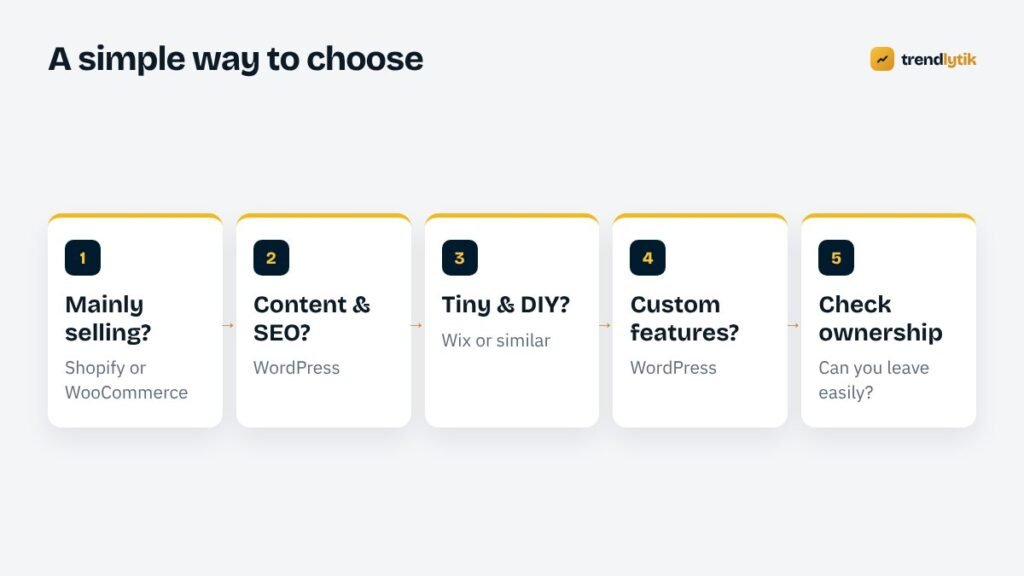
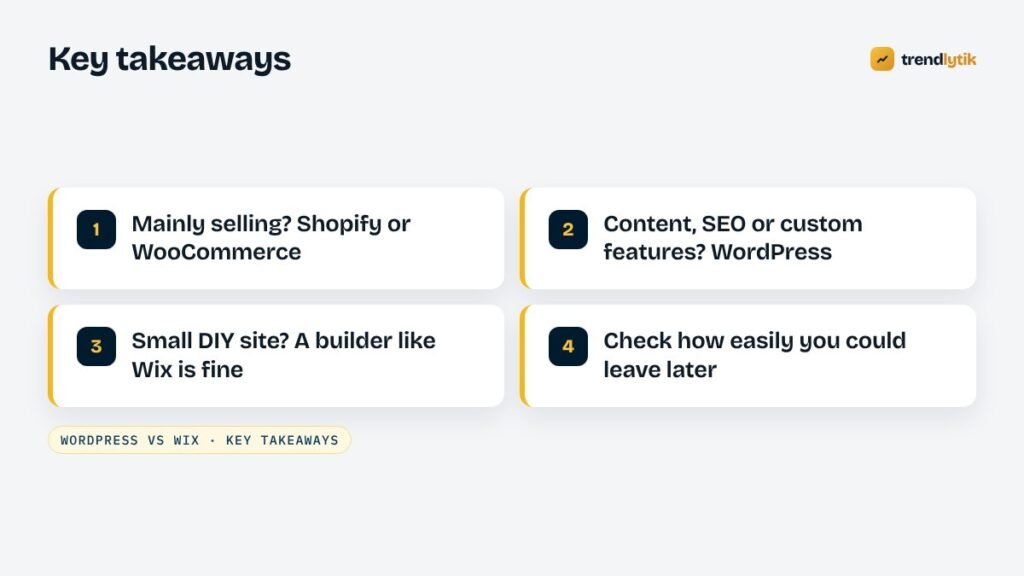
- Is selling products the main purpose? Choose Shopify for simplicity, or WooCommerce for control and custom needs.
- Will content and search be a major source of customers? Choose WordPress.
- Is it a small site you will build and manage yourself, with no plans to grow? Wix or a similar builder is fine.
- Do you need custom features — bookings, calculators, portals, AI tools, integrations? Choose WordPress.
- Could you leave easily if your needs change? If the answer matters to you, favour WordPress.
Three example businesses
A home repair company wants to rank for its services across several suburbs, take bookings online and publish helpful articles. Content, local SEO and a custom booking system point clearly to WordPress — the approach we took for All About Repair.
A small skincare brand sells twenty products, wants a beautiful store quickly and has no interest in managing hosting. Shopify is a strong fit; WooCommerce is worth considering only if they want custom features or a content-led site.
A freelance photographer needs a portfolio, an about page and a contact form, and enjoys designing it personally. A builder such as Wix is perfectly reasonable — though a WordPress starter site gives more room to grow.
When we recommend something other than WordPress
If you are on a tight budget, our guide to what a $100 website can do may also help you decide.
We will tell you if a hosted platform suits you better. Typical cases: a small product business that wants a store running quickly with minimal maintenance (Shopify), or a one-person business that wants to build and edit a few pages entirely on their own (a builder). Choosing the right tool for your stage is more important than choosing the “best” platform in the abstract.
Common myths
- “WordPress is only for blogs.” It started as blogging software, but today it powers business sites, stores, publications and custom applications.
- “WordPress is insecure.” Most problems come from outdated plugins, weak passwords and neglected sites, not from WordPress itself. A maintained site is secure.
- “Wix sites can’t rank.” They can. Content, relevance and reputation matter far more than the platform for most small sites.
- “Shopify is only for big stores.” It works well for small catalogues too; the question is whether the monthly costs and limits suit your business.
Switching later
If you are already on Wix or Shopify and considering WordPress, plan the move like a redesign: inventory every page, rebuild the design, move content carefully and redirect every URL. Done well, you keep your rankings and gain flexibility. Our guide to redesigning without losing SEO walks through the steps.
Not sure which platform fits? Tell us about your business and we will give you an honest recommendation — even if it is not WordPress.
Sources and further reading
- WordPress.org — the self-hosted, open-source platform.
- Shopify — the hosted ecommerce platform.
- Wix — the hosted website builder.
Questions about this topic.
Is WordPress better for SEO than Wix or Shopify?
All three can rank well. WordPress gives you the most control over technical SEO, structure and content, which matters most for content-heavy and competitive sites. For a small brochure site, the difference is smaller than the quality of your content.
Can I move from Wix to WordPress?
Yes, but expect to rebuild the design and move content page by page, with redirects for every URL. Wix does not offer a full-site export to other platforms.
Should I use Shopify or WooCommerce?
Shopify suits businesses that want a hosted store with minimal technical work. WooCommerce suits businesses that want full control, a combined content-and-store site or custom features, and are happy to manage hosting and maintenance or have someone do it for them.